penguins in the Tundra
I recently came into posession of a really cool rock. Four of them, actually. (Anyone know how to get a standard camera mount to stick out of one's sternum?)
Full-body tracking for VR is incredibly niche. It's an expensive add-on (~$130 per tracker, and you need at least three of them) to an already expensive medium: ~$400 for a Quest 2, which doesn't really support full-body tracking in its standalone mode, so you need a ~$600+ Gaming™ PC to drive it - and wait, the full-body trackers on the market today use outside-in tracking, so you need at least base stations that are perputually out of stock and cost $200 each. (You can dodge the base stations being out of stock by buying the $1000 Valve Index kit that comes with two of the things.)
And once you have all that set up, there's like, three games on Steam that actually use them.
But, despite all of that, it's still somehow worth it. It's really, really, really gratifying to be able to kick someone in the head in VRChat (or dance or lie down correctly I guess). At least, if you're hosting the same species of brain worms that I am. But if you're one of those people, you're also really likely to not be running Windows. So how much of a pain in the neck is it to get your shiny new ankle monitors to play nice with SteamVR on Linux?
Let's start with a sanity check: how painful is this process on Windows?
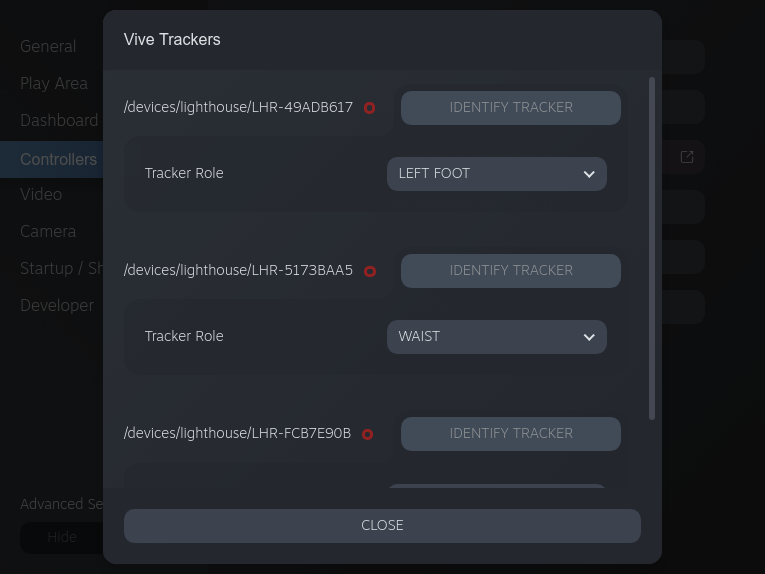
After shoving Tundra Labs' SW4 in the front compartment of my Index, getting three of my trackers charged and screwed on to straps (one for each foot and one for my waist), and powering the whole thing up, SteamVR immediately detects the new lot of hardware and I can see the trackers represented with an accurately tracked 3D model in SteamVR's system menus (the same way the Knuckles controllers are). The tricky part is setting up the "role" of each tracker. While things like Knuckles controllers are essentially hard-coded to be your left and right hands, generic trackers need to be explicitly told what they represent.
The tricky part is figuring out which tracker you're assigning a role to. SteamVR essentially gives you a list of serial numbers and asks you what they should represent. There is a button labeled "identify" for each tracker in the UI, but that doesn't actually seem to do anything? Maybe I'm just missing something, but it doesn't seem to cause an LED blink or anything, and Tundra Labs' trackers don't have their serial numbers printed anywhere easily visible. (Maybe it's on the PCB or something, but I didn't crack mine open to check.) This means the best strategy for configuring your trackers is to turn them on and configure them one at a time, being careful not to overwrite your previous configuration.
Once all that's done, you can hop into VRChat, click "Calibrate FBT" in the
launchpad, assert dominance over desktop and Quest users stand in a t-pose
with your real body to line up with your avatar, then click the triggers on your
handheld controllers and poof: you have legs!
Well, ok, that was pretty straight forward. Tundra Labs' hardware is a pretty well-trodden path, so it's not surprising that getting this going went well overall. Configuring which tracker is which body part kinda sucks, but we didn't have to do something stupid like buying a high-end USB PCI-e card (cough Linus Sebastian cough).
Reboot. Welcome back to Linux. Feels like home.
Thankfully, the trackers are bonded to the SW dongle specifically, so we don't have to fuss with re-pairing every time we reboot or getting the same keys on both "systems" or something. And the UI for configuring the trackers is (modulo the SteamVR web helper being... strange) the same as it was on Windows.
Well, it looks the same. Only problem is that it doesn't actually work.
Selecting a role for some tracker from the dropdown works maybe 10% of the
time. The rest of the time, the input just gets stubbornly eaten by SteamVR,
leaving you sad and your trackers useless. There's an open issue about this on
ValveSoftware/SteamVR-for-Linux, but who knows when or
if Valve will take a look at it. In the meantime, you, dear reader, have two
options:
~/.steam/steam/config/steamvr.vrsettings in your text editor of choice and fix it.Some trawling through my Windows installation revealed how SteamVR keeps track
of what tracker is what: in steamvr.vrsettings, there's a trackers key which
maps each tracker to its role. It looks like this:
{
  "trackers": {
    "/devices/lighthouse/LHR-XXXXXXXX" : "TrackerRole_LeftFoot"
  }
}
Each tracker has its own entry in this mapping. The various TrackerRoles appear to be:
TrackerRole_HandedTrackerRole_LeftFootTrackerRole_RightFootTrackerRole_LeftShoulderTrackerRole_RightShoulderTrackerRole_LeftElbowTrackerRole_RightElbowTrackerRole_LeftKneeTrackerRole_RightKneeTrackerRole_WaistTrackerRole_ChestTrackerRole_CameraTrackerRole_KeyboardEach of these neatly corresponds to one of the tracker roles offered in the SteamVR UI. From here, it's pretty straightforward to get things labeled as we like:
{
  "trackers": {
    "/devices/lighthouse/LHR-XXXXXXXX" : "TrackerRole_LeftFoot",
    "/devices/lighthouse/LHR-XXXXXXXX" : "TrackerRole_RightFoot",
    "/devices/lighthouse/LHR-XXXXXXXX" : "TrackerRole_Waist"
  }
}
Yours may be in a different order. It's JSON, it all comes out in the wash.
Honestly, this works way better than I expected. Of course, I'd like it if SteamVR's UI did its job properly, but a broken GUI that can be easily sidestepped by editing one simple config file is far from the worst user experience this could have been. And once that's done, everything Just Works like it did on Windows!
Regardless of platform, find some way to keep your left and right foot trackers from getting mixed up. I keep mine wrapped around the matching Knuckles controllers, but you could also try something like labelling the strap (not the tracker itself, you don't want to cover one of the sensors) or getting the $5 strap loop baseplates and threading them onto a cheap pair of shoes or something (e.g. ThrillSeeker).
I'm interested in exploring other options as well - SlimeVR in particular looks
like a good, low-cost way to get trackers for other track points. And if any of
that happens, we'll ask you about it on Wait Wait, Don't Tell Me I'll be
sure to write it up as well.
